Delta Executor for iOS is installed as an IPA file, not from the App Store. The quickest way is the official direct-install link; the most stable way is sideloading the IPA with a computer (Sideloadly or AltStore). After installing, trust the developer profile, enable Developer Mode if asked, then open Delta and get your free key. No jailbreak is needed.
Delta Executor iOS at a Glance
| Detail | Delta iOS |
|---|---|
| File type | .ipa (iOS app package) |
| Latest version | v2.743 (matches Roblox for iOS) |
| Devices | iPhone and iPad |
| iOS version | iOS / iPadOS 15 or newer |
| Jailbreak | Not required |
| Install methods | Direct install, sideload with PC/Mac, on-device signing |
| Price | Free with key system |

How to Download Delta Executor for iOS
Tap Get for iOS in the download box above. Depending on what the Delta team currently offers, you will get either a direct-install link or the IPA file itself. Always use the official link — iOS “Delta” apps on random sites often ask you to install profiles or complete endless “human verification” offers. A real IPA never needs you to install a configuration profile or VPN.
3 Ways to Install Delta on iPhone and iPad

| Method | Needs a computer? | Stability | Best for |
|---|---|---|---|
| Direct install link | No | Can stop if the certificate is revoked | Fastest setup |
| Sideload with Sideloadly / AltStore | Yes (first time) | Most reliable; refresh every 7 days with a free Apple ID | Users with a PC or Mac |
| On-device signing app | No | Depends on the certificate you use | iPhone-only users |
Method 1: Direct install (no computer)
- Open the link in Safari Other browsers may not trigger the install prompt.
- Tap Install Confirm the pop-up. The Delta icon appears on your home screen and downloads.
- Trust the developer Go to Settings → General → VPN & Device Management, tap the developer name and choose Trust.
- Open Delta Log in with a secondary Roblox account and get your key.
Method 2: Sideload the IPA with a computer
- Install a sideloading tool Download Sideloadly or AltServer on your Windows PC or Mac, plus iTunes/iCloud from Apple on Windows.
- Connect your iPhone Use a cable and tap “Trust this computer” on the phone.
- Load the Delta IPA Drag the IPA into the tool and sign in with an Apple ID (a secondary Apple ID is a good idea).
- Enable Developer Mode On iOS 16+, go to Settings → Privacy & Security → Developer Mode, turn it on and restart.
- Trust and open Trust the profile in VPN & Device Management, then launch Delta.
Note: With a free Apple ID, sideloaded apps expire after 7 days. AltStore can refresh them automatically over Wi-Fi; with Sideloadly you simply sign the IPA again.
Method 3: On-device signing (without a computer)
Signing apps such as ESign, Scarlet or Feather can install an IPA directly on the phone if you import a valid signing certificate. This works without a computer, but you rely on that certificate staying valid. If Delta suddenly refuses to open, the certificate has usually been revoked — re-sign with a working one or switch to Method 2.
Unlock Delta iOS with the Free Key
The key system on iOS is the same as on Android: join a game, tap the Δ button, choose Receive Key, finish the checkpoints in Safari, copy the key and paste it into Delta. Keys normally last about 24 hours. Full walkthrough: how to get the Delta key.
How to Update Delta Executor on iOS
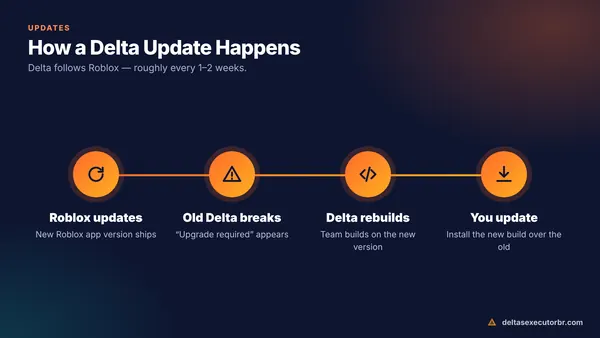
When Roblox updates, an old Delta build will show “update required” or close instantly. To update:
- Get the newest IPA or direct-install link from the download box.
- Install it the same way you installed the first time. It replaces the old app.
- Re-trust the developer if iOS asks, then open Delta and enter a new key if needed.
See the complete Delta update guide for checking your version and keeping saved scripts.
Fix Common Delta iOS Problems
| Problem | Fix |
|---|---|
| “Unable to verify app” | Connect to the internet, then trust the developer again in VPN & Device Management. |
| “Untrusted developer” | Settings → General → VPN & Device Management → Trust. |
| App opens then closes | Certificate revoked or version outdated — reinstall the newest IPA. |
| Developer Mode missing | It only appears after a sideloaded app is installed; install first, then check Privacy & Security. |
| Install stuck on “Waiting” | Free up storage, delete the stuck icon and try again on Wi-Fi. |
More solutions: Delta Executor not working.
Delta iOS vs Android
The scripts and editor are the same, but Android is simpler to install and update, while iOS depends on signing certificates. If you have both devices, Android is the less frustrating option. Compare all platforms on our Delta Executor home page or read the Android APK guide.
Account warning: Using Delta breaks the Roblox Terms of Use on every platform. Use a secondary Roblox account and never enter your Apple ID password into a website that claims to “unlock” Delta.
- Delta iOS is an IPA — installed by direct link, sideloading or on-device signing.
- Trust the developer profile and enable Developer Mode when iOS asks.
- If Delta stops opening, re-sign or reinstall the newest IPA.
Frequently Asked Questions
Is Delta Executor available on the App Store?
No. Delta is not on the App Store because executors break Apple's and Roblox's rules. It is installed as an IPA file through a direct-install link or a sideloading tool.
Can I install Delta on iPhone without a computer?
Yes. You can use the official direct-install link when it is available, or an on-device signing app with a valid certificate. Both work without a PC, but certificates can be revoked, which stops the app from opening until you reinstall.
Do I need to jailbreak my iPhone?
No. Delta for iOS runs on non-jailbroken iPhones and iPads running iOS 15 or newer.
Why does Delta stop opening after a few days?
If you sideloaded with a free Apple ID, apps expire after 7 days and must be refreshed. If you used a direct-install link, Apple may have revoked its certificate. Reinstall or re-sign the IPA to fix it.
How do I update Delta Executor on iOS?
Get the newest IPA or direct-install link and install it over the old app. With AltStore or Sideloadly, sign the new IPA the same way you installed the first one. Your key may need to be renewed after updating.
Does Delta iOS work on iPad?
Yes. The same IPA works on iPads running iPadOS 15 or newer, and the larger screen makes the script editor easier to use.