To install the Delta Executor APK, download the latest build (about 230 MB) from the official source, allow “Install unknown apps” for your browser, open the file and tap Install. Then open Delta, sign in to Roblox and unlock it with the free key. No root is needed and it works on Android 8.0 or newer.
Delta Executor APK Info
The Android version is the original and most popular form of Delta. It is a modified Roblox client packed as an APK, so it installs outside the Google Play Store.
| Detail | Delta Executor APK |
|---|---|
| Latest version | v2.743 (2026 Android APK) |
| File type | .apk (Android package) |
| Size | About 230 MB |
| Android version | 8.0 or newer |
| Architecture | ARM64 (most phones made after 2018) |
| Root | Not required |
| Price | Free with key system |

How to Download the Delta Executor APK
Use the Download APK button at the top of this page. Before you install anything, run these quick checks — they take 30 seconds and protect you from the many fake “Delta mod” files online:
- File size: the real APK is roughly 200–250 MB because it contains the full Roblox client. A 5 MB or 20 MB “Delta APK” is not the real app.
- File name and version: the version in the file name should match the latest Roblox version (currently 2.743).
- No extra installers: the download should be a single .apk file — never an .exe, a .zip with a password, or an app that asks to “download Delta for you”.
- Scan it: you can upload the file to a multi-engine scanner before installing. Expect a few “riskware” labels; a long list of trojan detections is a red flag.
Tip: If you have mobile data limits, download on Wi-Fi. A half-finished download is the number one cause of the “There was a problem parsing the package” error.
How to Install Delta Executor on Android
These steps work on Samsung, Xiaomi/Redmi/POCO, Oppo, Vivo, Realme, Infinix, Tecno, Motorola and Pixel phones. Menu names differ slightly between brands.
- Free up storage Make sure you have at least 1 GB free. Delta needs extra space after install for game data.
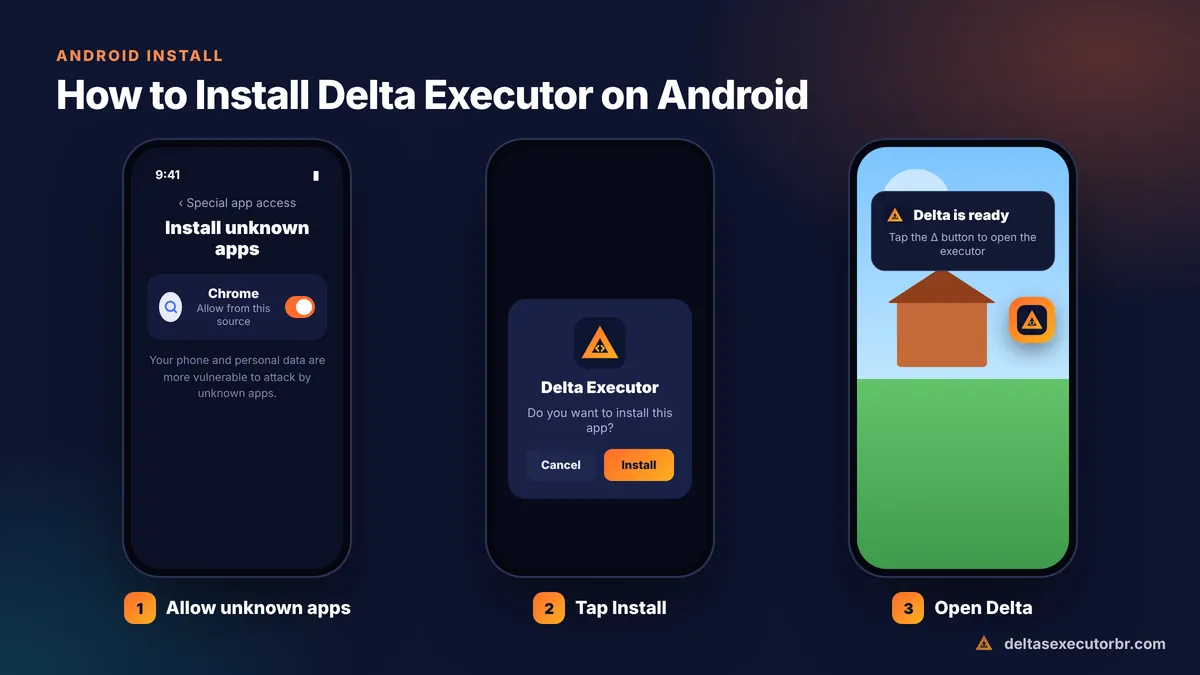
- Allow unknown apps Go to Settings → Apps → Special app access → Install unknown apps, choose Chrome (or your file manager) and switch on “Allow from this source”.
- Open the APK Open Downloads or your notification bar and tap the Delta APK file.
- Tap Install If Google Play Protect warns you, read the warning. It appears because Delta changes the Roblox client. Choose “More details → Install anyway” only if you downloaded from the official source.
- Open Delta Tap Open. The first launch can take a minute while it prepares game files.
First-Time Setup: Log In and Get Your Key
When Delta opens, it looks like the normal Roblox app with an extra floating Δ button.
- Log in to Roblox. Use a secondary account. Any account used with an executor risks a ban.
- Join any game and wait for it to load.
- Tap the Δ button. If you do not have a key, the key screen appears.
- Tap “Receive Key”, finish the checkpoints in your browser, copy the key, return to Delta and paste it.
Problems with the key? See the full Delta Executor key guide. Ready to run scripts? Follow how to use Delta Executor.
How to Update the Delta Executor APK
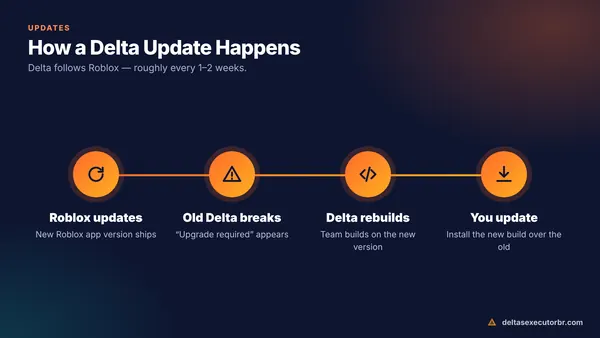
Roblox updates almost every week, and Delta follows. When Delta stops opening or shows “upgrade required”, you need the newest APK.
- Copy any scripts you saved in Delta to a notes app (just in case).
- Download the newest APK from the button above.
- Install it over the old version. If you get “App not installed”, uninstall the old Delta first and install again.
- Open Delta — you may need a new key after updating.
More details, including how to check your current version, are in our Delta Executor update guide.
Delta Executor Android Requirements
| Item | Minimum | For smooth play |
|---|---|---|
| Android | 8.0 | 11 or newer |
| RAM | 3 GB | 6 GB+ |
| Storage | 1 GB free | 3 GB free |
| Processor | 64-bit ARM | Snapdragon 7-series / Dimensity 7000+ or better |
| Internet | Stable 4G or Wi-Fi | Wi-Fi |
Older or 32-bit phones may install Delta but crash in heavier games. The full requirements guide has tips for low-end devices.
Fix: Delta Executor APK Not Installing
| Error | Cause | Fix |
|---|---|---|
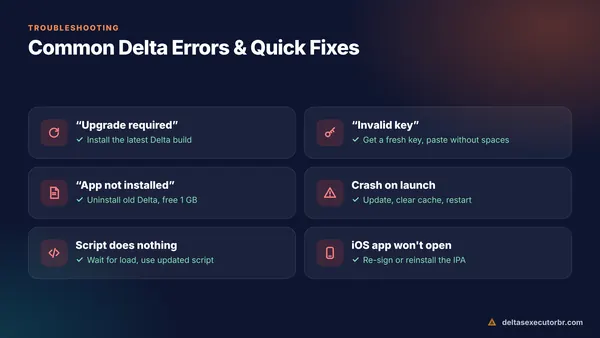
| App not installed | Old build with a different signature, or low storage | Uninstall old Delta, free 1 GB+, reinstall |
| Problem parsing the package | Incomplete or corrupted download | Delete the file and download again on Wi-Fi |
| Blocked by Play Protect | Play Protect flags modified apps | Tap More details → Install anyway (official file only) |
| App keeps closing | Version mismatch with Roblox or low RAM | Install newest build, close background apps |
| “Upgrade required” | Roblox updated | Download the latest Delta APK |
For crashes, black screens and script problems, see Delta Executor not working: all fixes.
Is the Delta Executor APK Safe?
The official APK is used by millions of players, but two risks are real. First, fake APKs from copycat sites can carry adware or account stealers. Second, using any executor breaks Roblox rules and can get the account banned. Read our honest safety check before you start.
Tips for Using Delta on Your Phone
- Lower graphics in Roblox settings for heavy games — it reduces crashes on 3–4 GB RAM phones.
- Move the Δ button to a corner so it does not cover game controls.
- Keep battery saver off while playing; it can kill Delta in the background.
- Save your favourite scripts inside Delta so you do not need to paste them every time.
- The real Delta APK is about 230 MB and matches the current Roblox version.
- Allow unknown apps, install, log in with a secondary account and get a free key.
- Update whenever Roblox updates — old builds stop working.
Frequently Asked Questions
Is the Delta Executor APK free?
Yes. The APK is free. Delta unlocks with a free key that you get from the official key page; a key normally lasts around 24 hours.
Do I need to root my phone for Delta Executor?
No. Delta Executor installs like any other APK on a normal, non-rooted Android phone. You only need to allow installs from unknown sources for the app you download it with.
Why does my phone say “App not installed”?
Usually because an older Delta build with a different signature is already installed, the download is incomplete, or there is not enough storage. Uninstall the old version, free at least 1 GB and download the APK again.
Can I install Delta and the official Roblox app together?
In most builds, yes — Delta installs as a separate app. If the two conflict on your phone, uninstall the official Roblox app or turn off its auto-updates.
Which Android version do I need for Delta Executor?
Android 8.0 or newer is the practical minimum, but Android 11+ with at least 4–6 GB RAM gives a much smoother experience.
How do I update the Delta APK?
Download the newest APK and install it over the old one. If the installer refuses, uninstall the old build first. Back up any saved scripts before uninstalling.